Email Marketing Automation Best Practices: Strategies, Metrics and Common Mistakes
Discover the best email automation practices to improve relevance, personalization, deliverability, engagement, and conversions while avoiding common automation mistakes.
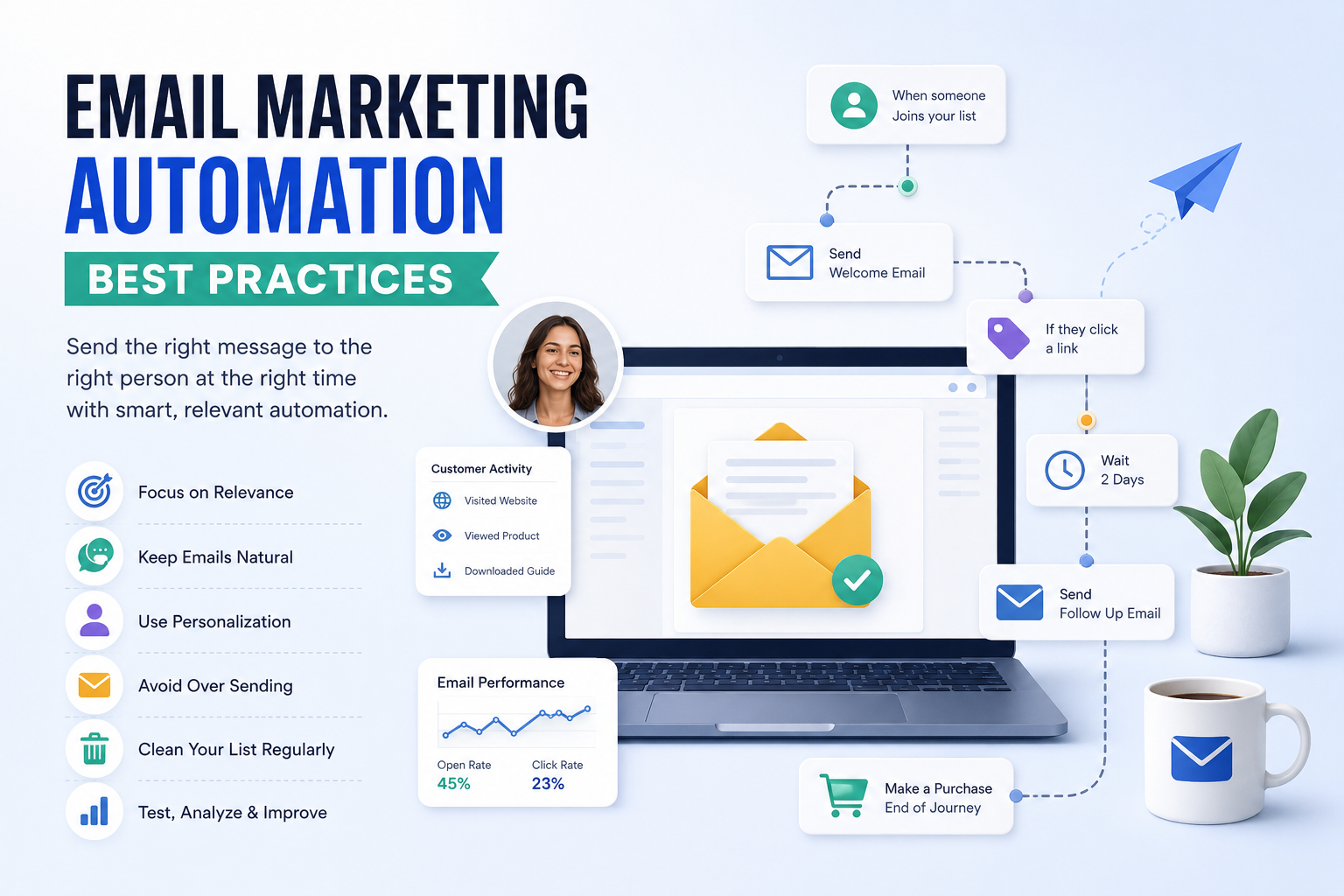
Email marketing automation has become an important part of modern digital marketing. Instead of manually sending every follow-up email, businesses can create automated customer journeys that respond to subscriber actions, interests, and engagement.
But automation alone does not guarantee better results. Sending irrelevant messages, contacting subscribers too frequently, or ignoring inactive contacts can quickly lead to unsubscribes, spam complaints, and poor engagement.
That is why following proven email automation best practices matters.
Effective automation is not about sending more emails with less effort. It is about sending the right message to the right person at the right time while making every interaction feel useful and relevant.
1. Email Marketing Automation Best Practices
The foundation of successful email automation is relevance.
Before creating an automated workflow, define its purpose. A welcome sequence has a different objective from an abandoned cart campaign, post-purchase sequence, or lead nurturing workflow.
A good automation should answer three simple questions:
- Why is this person receiving this email?
- Why are they receiving it now?
- What useful action should they take next?
For example, someone who has just subscribed to your newsletter should not necessarily receive the same promotional message as a customer who purchased from your business six months ago.
This is where segmentation, personalization, and behavioral triggers become important. If you want to understand how audience groups can be targeted more effectively, explore email segmentation as part of your overall email marketing strategy.
The best email automation feels less like a scheduled broadcast and more like a natural continuation of the customer's journey.
2. Focus on Relevance
Relevance is one of the most important email automation best practices because subscribers are more likely to engage with messages that match their interests and actions.
Instead of sending identical emails to your entire database, use customer information and behavioral signals where appropriate.
You can create different automation paths based on:
- Pages someone visits
- Products they view
- Previous purchases
- Forms they complete
- Content they download
- Email engagement
- Customer lifecycle stage
For example, someone who downloads an email marketing guide could enter an educational sequence about email campaigns rather than receiving unrelated promotional offers.
Google recommends that senders obtain recipient consent and send messages that subscribers actually want to receive. Its bulk email guidance also emphasizes sending relevant messages and providing an easy way to unsubscribe. Google's bulk email best practices provides additional guidance for businesses managing commercial email campaigns.
The goal is simple: every automated email should make sense in the context of the subscriber's previous action.
3. Keep Emails Natural
Automation should save your team time without making your emails sound robotic.
Avoid writing every automated message like a corporate announcement. Instead, use conversational language that sounds like something a real person would actually send.
For example, instead of:
"Dear valued customer, we are pleased to inform you about our latest promotional offering."
Try:
"Hey Sarah, you were checking out our latest collection, so I thought you might like these options."
The second version feels more natural because it connects the message to an actual customer action.
Keep paragraphs short, avoid unnecessary jargon, and focus on one main idea in each email.
A good automated sequence should feel like a conversation rather than a collection of scheduled advertisements.
4. Use Personalization
Personalization is another important part of effective email automation.
Adding a subscriber's first name can be useful, but personalization does not have to stop there. You can use information about customer behavior, previous purchases, interests, and engagement to make emails more relevant.
For example, an ecommerce business could create different follow-up emails for people who:
- Purchased a product
- Added a product to their cart
- Viewed the same product multiple times
- Downloaded a buying guide
- Have not purchased recently
However, personalization should have a purpose.
Do not use every piece of customer data simply because your email platform allows it. Use information that genuinely improves the subscriber's experience.
MailSnappy also provides audience segmentation tools that can help businesses organize contacts and create more targeted email campaigns based on subscriber information and behavior.
5. Avoid Over Sending
One of the most common email automation mistakes is sending too many messages.
A subscriber can potentially enter several workflows at the same time. For example, they might be receiving a welcome sequence while also being enrolled in a promotional campaign and an abandoned cart workflow.
Without proper automation rules, that subscriber could receive several emails within a very short period.
To prevent this, establish:
- Frequency limits
- Workflow priorities
- Exit conditions
- Suppression rules
- Campaign exclusions
Google recommends sending email at a reasonable volume and avoiding unwanted or excessive messages. Keeping communication relevant is especially important because recipients can mark unwanted messages as spam, which can negatively affect future deliverability.
Automation should improve the customer experience, not overwhelm the inbox.
6. Keep Your Email List Clean
A large email list is not necessarily a valuable email list.
If a significant percentage of your database consists of invalid, inactive, or unengaged contacts, continuing to email those people can affect campaign performance and potentially contribute to deliverability problems.
Regularly monitor:
- Hard bounces
- Unsubscribes
- Spam complaints
- Long-term inactive subscribers
- Invalid email addresses
You should also avoid purchasing email lists. Building a permission-based list gives you a much stronger foundation for long-term email marketing.
If your goal is to grow your list with genuine subscribers, you can also use MailSnappy signup forms and audience growth tools to collect new contacts through forms and landing pages.
For inactive subscribers, consider running a short re-engagement campaign before suppressing them from future marketing emails.
7. Use Clear Subject Lines
Your subject line creates the first impression of your email.
A good subject line should accurately communicate what the email contains without relying on misleading claims or excessive clickbait.
Examples include:
- Your guide to choosing the right email platform
- 3 ways to improve your email campaigns
- Your cart is still waiting
- Here's what to do after signing up
Avoid subject lines that promise something the email does not deliver.
The FTC's CAN-SPAM Act compliance guide states that commercial emails must not use deceptive subject lines and must provide recipients with a way to opt out of future marketing messages.
You can also test different subject lines to understand which messaging resonates with your audience.
8. Make Unsubscribing Easy
Making it difficult for subscribers to leave your mailing list is not a good retention strategy.
Every marketing email should provide a clear and accessible way for people to unsubscribe.
For businesses sending marketing messages to personal Gmail accounts at bulk volumes, Google requires additional sender practices, including one-click unsubscribe for relevant promotional and subscribed messages. Google also recommends keeping user-reported spam rates below 0.1% and preventing them from reaching 0.3% or higher.
You can review the current requirements in Google's Email Sender Guidelines.
For businesses subject to US CAN-SPAM requirements, commercial emails must provide an opt-out mechanism, and businesses must honor opt-out requests within the required timeframe. The FTC's CAN-SPAM compliance guide explains these requirements in detail.
An easy unsubscribe process can actually improve list quality because the people who remain are more likely to genuinely want your emails.
9. Email Deliverability and Automation
Automation does not guarantee that your emails will reach the inbox.
Deliverability depends on several factors, including sender reputation, authentication, engagement, bounce rates, spam complaints, and sending practices.
Google's current sender requirements include authentication and other technical requirements for email sent to personal Gmail accounts. Bulk senders have additional requirements involving SPF, DKIM, DMARC, alignment, and one-click unsubscribe for relevant marketing messages. You can review the latest requirements in Google's Email Sender Guidelines.
It is also useful to monitor your sending reputation and spam rate through Google Postmaster Tools. Google provides information about spam rates, reputation, authentication, delivery errors, and other indicators that can help senders identify deliverability problems.
In simple terms, good deliverability starts with sending wanted emails to people who expect to receive them.
10. Email Marketing Automation Metrics
Automation should be measured continuously.
Instead of looking only at how many emails were sent, evaluate how subscribers interact with those emails and whether the automation is producing the intended business result.
Open Rate
Open rate can provide some insight into subject lines and initial engagement. However, privacy features and differences in tracking methods mean it should not be treated as a perfect measure of human engagement.
Click-Through Rate
Click-through rate shows how many recipients clicked links or calls to action within an email.
Conversion Rate
Conversion rate tells you how many recipients completed your desired action, such as purchasing a product, booking a consultation, or signing up for a service.
Unsubscribe Rate
A rising unsubscribe rate can indicate that your content, frequency, targeting, or expectations need attention.
Bounce Rate
Bounce rate helps identify problems with invalid or undeliverable email addresses.
Spam Complaint Rate
Spam complaints are particularly important because high complaint levels can damage sender reputation and affect future deliverability.
The best approach is to evaluate these metrics together rather than relying on a single number.
11. Common Email Automation Mistakes
Even a sophisticated automation platform cannot fix a weak strategy.
Some of the most common mistakes include:
Sending Too Many Emails
Multiple workflows can overlap and overwhelm subscribers.
Treating Everyone the Same
New leads, existing customers, and inactive subscribers usually have different needs.
Ignoring Workflow Exit Rules
A customer should not continue receiving promotional emails after completing the action that the workflow was designed to encourage.
Forgetting Mobile Optimization
Automated emails should be easy to read and interact with on smartphones and tablets.
Not Testing Before Launch
Check personalization fields, links, buttons, images, timing, unsubscribe functionality, and email rendering before activating a workflow.
Never Updating Old Automations
Customer behavior changes. Review your workflows regularly and improve them based on actual performance.
12. Email Automation vs Regular Email Campaigns
Automated emails and regular email campaigns are not competitors. They serve different purposes.
A regular email campaign is usually planned and sent to a selected audience at a specific time.
Examples include:
- Product announcements
- Seasonal promotions
- Newsletters
- Company updates
- Limited-time offers
Automated emails are triggered by an event, behavior, date, or customer characteristic.
For example:
Regular campaign:
"Summer Sale Starts Today"
Automated email:
"You viewed this product recently. Here are three details that may help you decide."
Regular campaigns are useful when you have something timely to communicate, while automation is particularly useful for ongoing customer journeys.
The strongest email marketing strategies often combine both approaches.
13. Simple Email Automation Strategy for Beginners
If you are new to automation, do not start by building dozens of complicated workflows.
Start with three fundamental sequences.
Welcome Sequence
Send a short series immediately after someone subscribes. Introduce your business, explain what subscribers can expect, and provide useful information.
Lead Nurturing Sequence
Help potential customers understand your product or service. Answer common questions, share useful resources, explain benefits, and gradually move subscribers toward a purchase or conversion.
Re-Engagement Sequence
Identify subscribers who have stopped engaging and send a short sequence designed to bring them back.
Once these three workflows are working properly, you can expand into abandoned cart emails, post-purchase sequences, product recommendations, renewal reminders, and other behavior-based automations.
If you want to create and manage automated customer journeys, explore MailSnappy's email marketing automation platform for workflow-based campaigns and subscriber journeys.
The important thing is to build automation around customer journeys rather than simply creating workflows because the feature exists.
14. How MailSnappy Can Help
MailSnappy is an AI-powered email marketing platform designed to help businesses create campaigns, manage subscribers, automate communication, and track campaign performance from one dashboard.
For businesses that need professional email designs for newsletters and automated sequences, MailSnappy's responsive email templates provide ready-made designs that can be customized for different campaigns.
MailSnappy also includes tools for audience management, segmentation, personalization, campaign analytics, and automation. This makes it possible to connect different parts of your email marketing workflow rather than managing each task separately.
The bigger principle, however, is that technology should support your email strategy rather than replace it.
Before creating an automation, define:
- Who should enter the workflow?
- What action triggers it?
- What value does each email provide?
- How many emails should the subscriber receive?
- When should the subscriber leave the workflow?
- What business outcome are you trying to achieve?
Once these questions are clear, your automation platform becomes much easier to use effectively.
15. FAQs
What are the best email automation practices?
The most important email automation best practices include using relevant segmentation, personalizing content appropriately, controlling sending frequency, maintaining a clean list, writing clear subject lines, monitoring deliverability, and regularly reviewing campaign performance.
How often should automated emails be sent?
There is no universal frequency that works for every business. It depends on the purpose of the workflow and what subscribers expect. The most important thing is to avoid overlapping campaigns and make sure every email provides a clear reason to exist.
What is the most important email automation metric?
Conversion rate is often one of the most valuable business metrics because it connects email activity with an actual business outcome. However, click-through rate, unsubscribe rate, bounce rate, and spam complaints should also be monitored.
Does email automation improve deliverability?
Automation itself does not automatically improve deliverability. Good list hygiene, proper authentication, permission-based sending, reasonable frequency, and low complaint rates are more important factors.
Should inactive subscribers be removed?
Long-term inactive subscribers should not remain in every campaign indefinitely. A re-engagement sequence can be used first. If subscribers still show no meaningful engagement, suppressing them from future marketing campaigns may be appropriate.
What should a beginner automate first?
A welcome sequence is usually an excellent starting point because it allows you to communicate with subscribers immediately after they join your list. Lead nurturing and re-engagement are useful next steps.
16. Conclusion
Effective email automation is not about sending the maximum number of emails with minimum effort. It is about creating useful, timely, and relevant communication that feels natural to the person receiving it.
The most effective email automation best practices are straightforward: understand your audience, use behavioral data responsibly, personalize when it adds value, avoid over-sending, maintain a clean list, make unsubscribing easy, protect deliverability, and continuously measure performance.
Start small instead of building a complicated automation system from day one. A well-written welcome sequence, lead nurturing workflow, and re-engagement campaign can give you a strong foundation.
As you collect performance data, use those insights to improve your messaging, segmentation, timing, and calls to action.
When strategy and technology work together, email automation becomes more than a time-saving feature. It becomes a consistent part of the customer journey that can help businesses nurture leads, retain customers, and generate measurable results.